Highlight. Right-Click. Done.
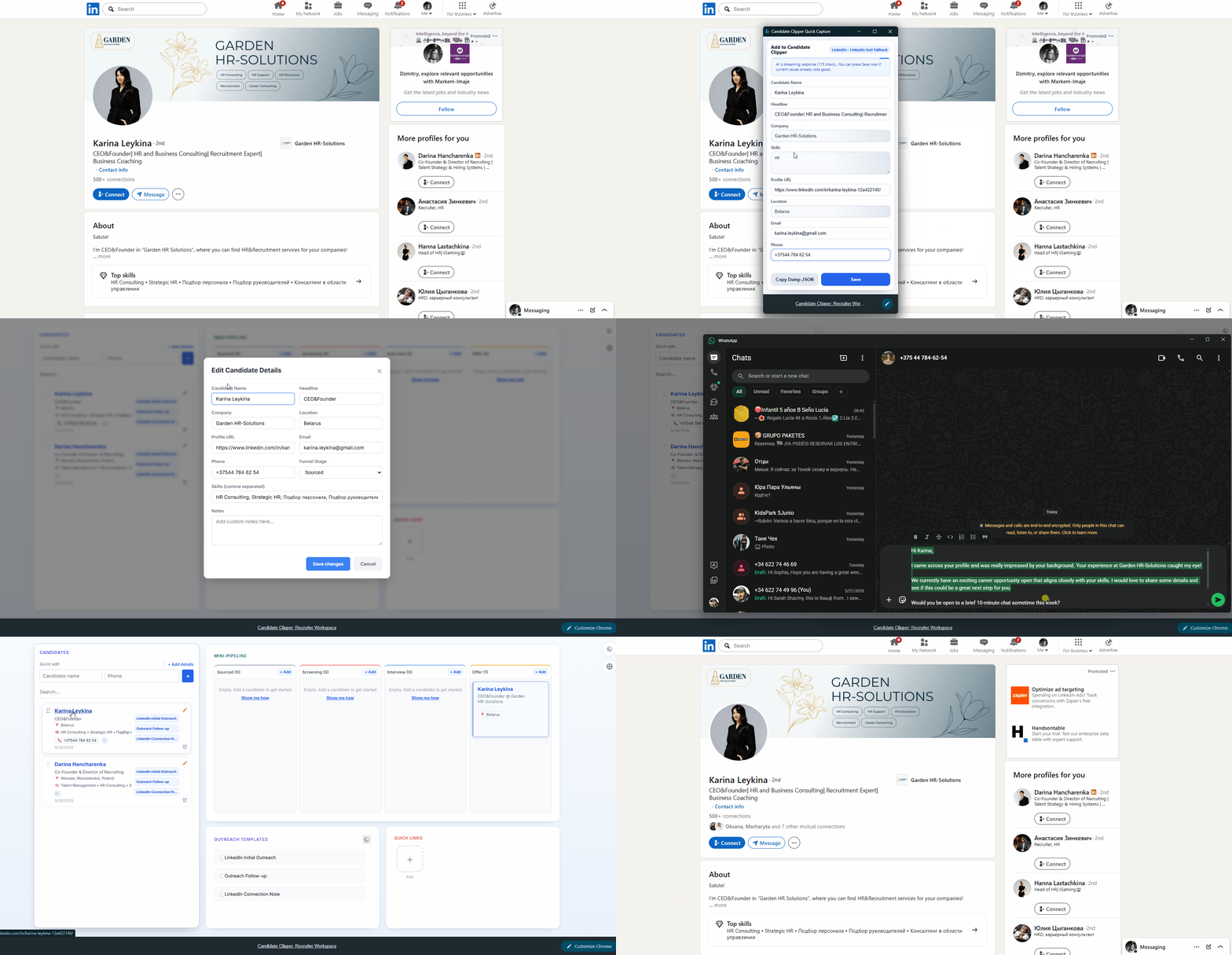
Select a candidate name anywhere on the web, right-click, and save instantly. Candidate Clipper captures profile URL and location automatically.
An ultra-lightweight CRM running directly in your Chrome New Tab. Save hours of manual data entry and draft outreach messages in seconds.
Works seamlessly on your favorite sites
Select a candidate name anywhere on the web, right-click, and save instantly. Candidate Clipper captures profile URL and location automatically.
Open Chrome New Tab and your ATS-style workflow is already there: Screening, Interview, Offer. No heavyweight CRM overhead.
Click a template and Candidate Clipper auto-fills name and company, then opens WhatsApp instantly when configured or copies to clipboard. In Pro, it can also draft and launch your email client.
Profiles are parsed programmatically in milliseconds—save instantly if you are in a hurry. Or wait just 3-7 seconds for the integrated on-device AI to automatically review, clean up formatting, and correct poorly filled fields on the fly.
Candidate Clipper is the lightweight workspace for daily sourcing: instant in a new tab, one-click capture, and local by design.
Traditional ATS / CRM
Built for HR teams, not for fast-moving sourcers.
Laggy cloud databases make every search and profile open feel sluggish.
Too much manual entry every time you want to keep a candidate.
Rigid corporate plans often start at $100/month or more.
Packed with tools you do not need for daily sourcing.
The lightweight way
Built for speed, privacy, and one-click capture inside your browser.
Opens in milliseconds every time you start sourcing.
Save a profile immediately without switching tools or tabs.
Candidate data stays on your device and never leaves your computer.
Only the core workflow you need: capture, organize, and outreach.
Your candidate database is stored locally in your browser via chrome.storage.local and never leaves your device. We do not have servers, we do not track your leads, and we cannot access your data.
Free Plan
For solo recruiters getting started
Pro Plan
For professional sourcers and agencies
Yes. Candidate Clipper is local-first. Candidate profiles are stored on your device and are not uploaded to our servers.